Click to navigate to Payments
View Beneficiary Library option under "Data Maitenance"
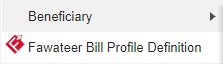
Click here to view Add Beneficiary option

Click to Add Beneficiary
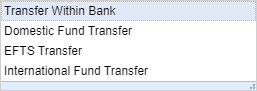








Select the Beneficiary Type from dropdown
Country information will be auto populated
Enter the Beneficiary NickName
Select Bank Name using lookup
Select a Bank Name by double clicking on a row / record
Enter the Beneficiary Account/IBAN Number
Enter the Beneficiary Name with Bank
Enter the Address Line 1
Enter the Address Line 2
Account and Bank details will be auto populated
Select the Customer Type
Select the CIF
Click to Submit
Displays the Beneficiary details
Click to confirm
Displays the Confirmation details
Click to Verify/Authorize or to Reject the authorized record
Click on Beneficiaries to Authorize the record

Select/ Right click the record to Accept
Click to Authorize the selected record
Displays the details
Click to Authorize

Enter the OTP number
Click here to Submit
Click Ok to proceed further